A digital marketing freelancer often manages multiple responsibilities at the same time—from keyword research and SEO audits to content creation, social media management, paid advertising, website optimisation, analytics, and client reporting. Having the right tools can make these activities more organised, measurable, and efficient. The right digital marketing freelancer tools can make everyday marketing tasks easier to manage.
However, using more tools does not automatically create better marketing. The goal is to build a practical digital marketing toolkit where every platform has a clear purpose and contributes to the overall strategy.
A freelancer may use one tool to discover keywords, another to analyse website performance, another to create content, and another to measure campaign results. The tools work together to support research, execution, measurement, and optimisation. Choosing suitable digital marketing freelancer tools can also improve the overall workflow.
This guide explains the essential digital marketing freelancer tools, what they are used for, how they fit into a campaign workflow, and how a freelancer can choose the right tools for different client requirements.
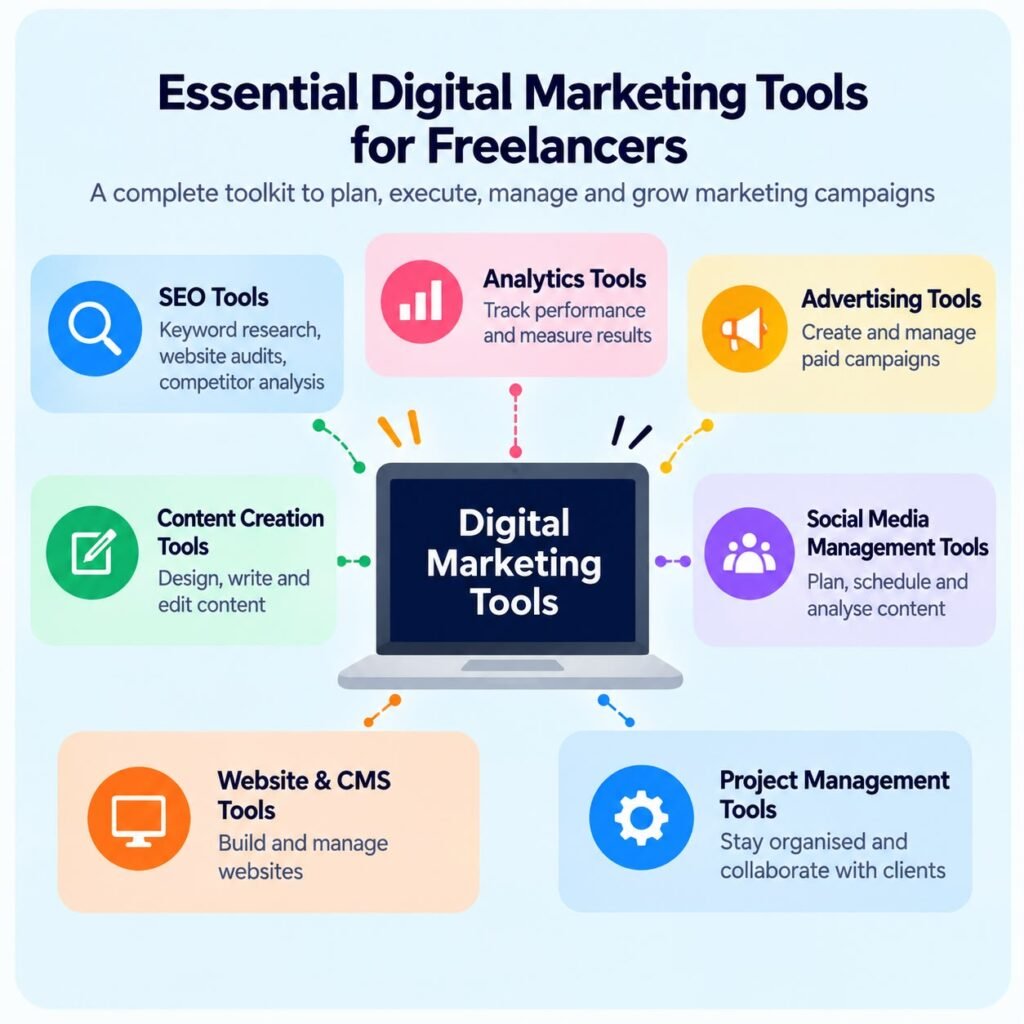
Digital marketing freelancer tools are software platforms that help independent marketers plan, execute, manage, analyze, and report on digital marketing activities.
The best digital marketing freelancer tools depend on the freelancer’s services and client requirements.
These tools can cover areas such as:
These digital marketing freelancer tools can support different stages of a marketing campaign.
For example, SEO platforms can help freelancers identify keywords, analyze competitors, monitor rankings, and audit websites. Semrush’s SEO tools include keyword research, site auditing, backlink analysis, and position tracking, while Ahrefs provides tools such as Site Explorer, Site Audit, Keywords Explorer, and Web Analytics.
The important point is that tools should support marketing decisions rather than replace them.
A freelancer still needs to understand the client’s business, target audience, goals, competition, budget, and customer journey before deciding which tools and channels to use.
Freelancers frequently work across several areas of digital marketing. Without an organised toolset, it can become difficult to manage information and track results. Using the right digital marketing freelancer tools can make this process more organised.
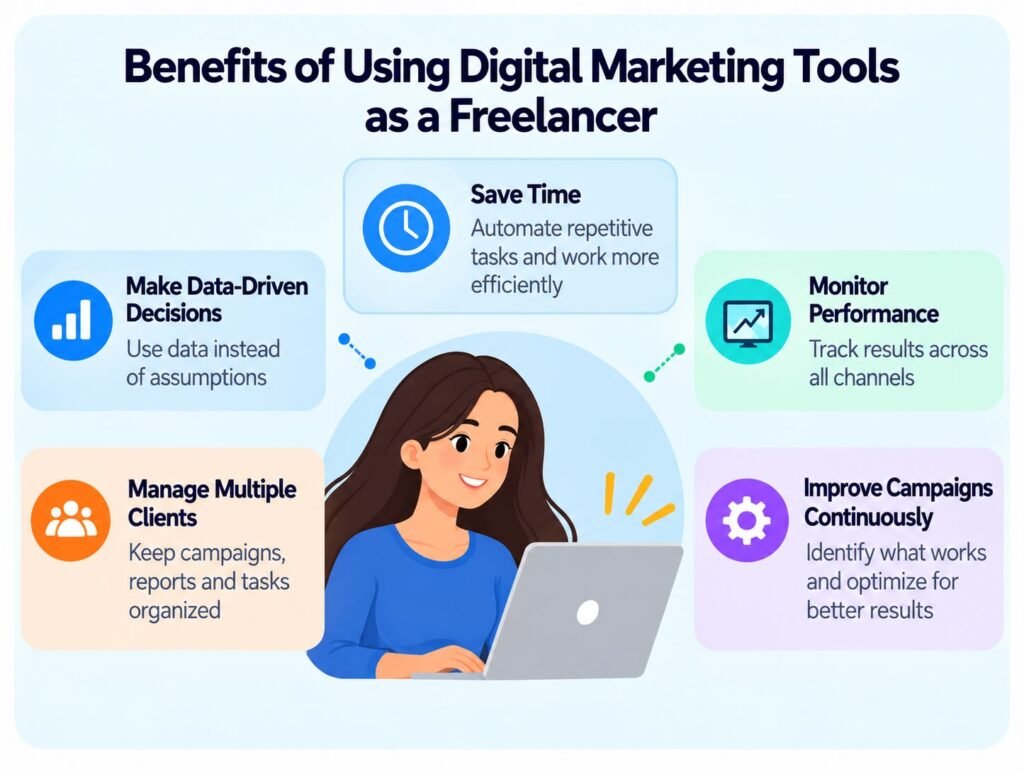
The right tools can help a freelancer:
Automated reports, scheduled social posts, website audits, and keyword databases can reduce repetitive manual work.
Instead of relying only on assumptions, freelancers can use website, search, advertising, and social media data to understand what is happening.
A structured toolkit can make it easier to separate campaigns, reports, content calendars, keywords, and project tasks. Reliable digital marketing freelancer tools can help freelancers manage work across multiple clients.
Marketing activities need to be measured against specific objectives. Analytics and reporting platforms help freelancers identify changes in traffic, engagement, leads, conversions, and other relevant metrics.
Digital marketing is not a one-time activity. A freelancer can analyze results, identify problems, make adjustments, and measure the results again. This is where digital marketing freelancer tools can help with ongoing campaign optimization.
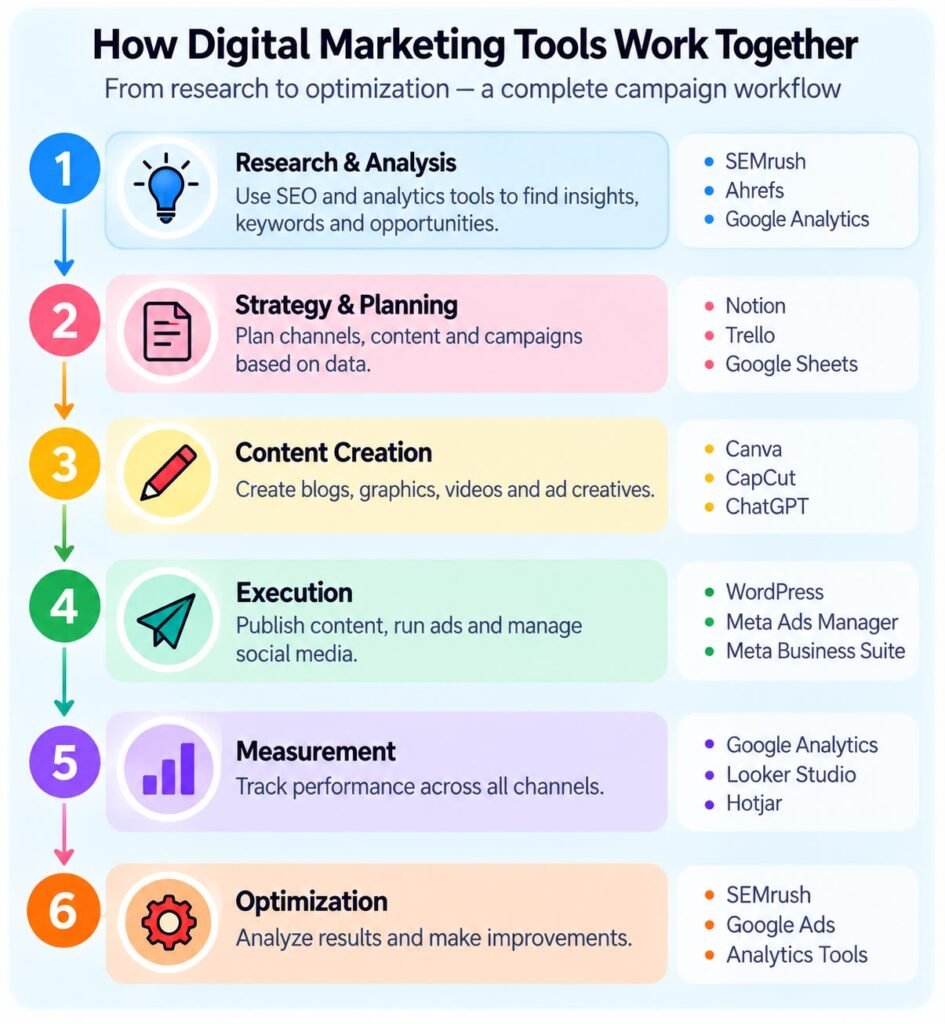
This creates a continuous process:
Research → Plan → Execute → Measure → Analyze → Optimize
That process connects directly with the broader strategy discussed in How a Digital Marketing Freelancer Creates a Digital Marketing Strategy?
There is no universal list of tools that every freelancer must use. The appropriate toolkit depends on the client’s objectives, industry, budget, website, advertising channels, and campaign requirements.
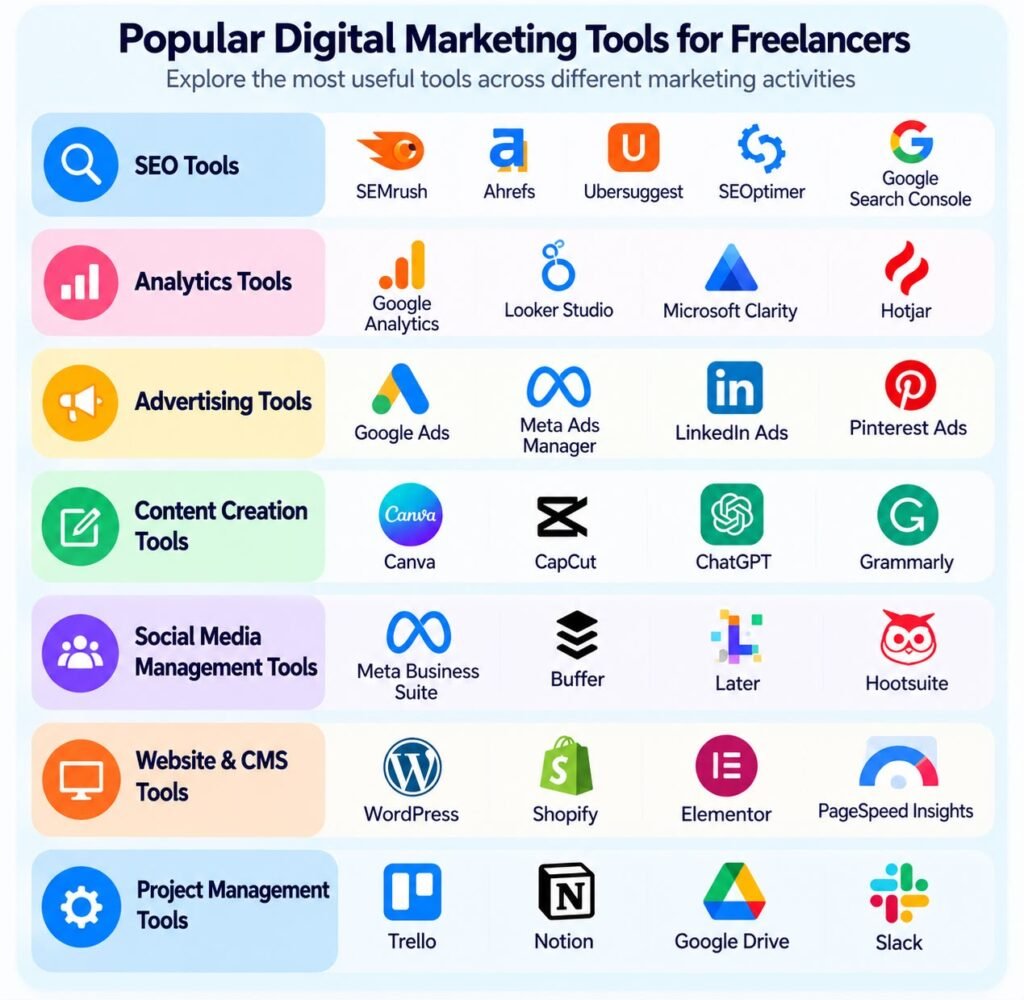
However, most freelance digital marketing workflows can be organised into seven major categories. These categories include some of the most useful digital marketing freelancer tools for freelancers.
The right digital marketing freelancer tools can make each part of this workflow easier to manage.
SEO tools help freelancers research search opportunities, evaluate websites, analyse competitors, monitor rankings, and identify technical issues. SEO is one of the most important areas where digital marketing freelancer tools are used.
Some commonly used platforms include:
Semrush is one of the most widely used digital marketing freelancer tools for SEO research and analysis.
Semrush provides tools for keyword research, competitor analysis, site auditing, backlink analysis, and position tracking. Its keyword research tools can help identify search terms, understand search intent, analyse competition, and organise keywords into content plans.
Its Site Audit functionality can identify technical and on-page issues and organise recommendations according to their severity.
A freelancer might use Semrush to:
Ahrefs is another useful option among digital marketing freelancer tools for SEO professionals.
Ahrefs provides tools for SEO research and website analysis. Its Site Explorer can show keywords, organic traffic information, and referring websites, while Site Audit identifies technical and on-page SEO issues.
For this reason, SEO-focused digital marketing freelancer tools are valuable for freelance marketers.
A freelancer can use Ahrefs for:
Ubersuggest can be used for keyword research, content ideas, competitor research, and basic SEO analysis.
It can be particularly useful when a freelancer wants a straightforward way to generate keyword and content ideas.
SEOptimer can be useful for website audits and SEO reporting. A freelancer can use an audit to identify issues related to areas such as SEO, performance, mobile usability, and website optimization.
Google Search Console is particularly useful for understanding how a website performs in Google Search.
It can help a freelancer investigate search queries, impressions, clicks, indexing-related information, and search performance.
SEO tools do not tell a freelancer exactly what a business should do. Instead, they provide data that can support decisions.
For example:
Keyword data → Content opportunity → Content creation → Ranking monitoring → Optimization
This makes SEO tools an important part of a freelancer’s wider marketing workflow.
Marketing activities need measurement. Analytics tools help freelancers understand what users are doing after they reach a website or interact with digital channels. Analytics is another important area supported by digital marketing freelancer tools.
Common tools include:
Google Analytics can be used to analyse website and app activity, understand traffic sources, evaluate user interactions, and measure conversions.
For a freelancer, analytics can help answer questions such as:
The answer to these questions can help determine which parts of a campaign need further attention.
These digital marketing freelancer tools can make client reporting more clear and efficient.
Looker Studio can be used to turn marketing data into dashboards and reports.
A freelancer can create client dashboards containing metrics such as:
This can make regular client reporting easier to understand.
Using the right digital marketing freelancer tools helps freelancers turn data into actionable insights.
Platforms such as Hotjar and Microsoft Clarity can help marketers understand how users interact with webpages.
For example, a freelancer may discover that visitors are reaching a landing page but not completing the form.
The next step could be to investigate:
This demonstrates an important principle: data should lead to questions, and those questions should lead to optimisation.
Paid advertising requires platforms that allow marketers to create, manage, monitor, and optimise campaigns.
Advertising platforms are essential digital marketing freelancer tools for managing paid campaigns.
Important advertising platforms include:
Google Ads can be used to advertise across Google’s advertising ecosystem. A freelancer managing search campaigns may use keyword research, audience information, campaign settings, ad copy, landing pages, and performance data together.
Keyword research is particularly important because the relationship between the search query, advertisement, and landing page can influence campaign relevance.
A freelancer can monitor metrics such as:
Meta’s advertising tools can be used to manage advertising campaigns across its platforms.
A freelancer may use Meta advertising for:
The exact campaign structure should depend on the client’s objective rather than simply following a standard setup.
The same approach should be followed when selecting digital marketing freelancer tools.
LinkedIn Ads can be particularly relevant when a campaign targets professional audiences or business-to-business markets.
A freelancer might use LinkedIn advertising for:
Paid advertising produces data quickly, but quick data does not necessarily mean quick success.
A freelancer needs to connect:
Audience → Offer → Ad → Landing Page → Conversion → Measurement
If one part of this journey is weak, simply increasing the advertising budget may not solve the problem.
Content creation is an important part of modern digital marketing.
Freelancers may create:
Useful tools include:
Canva can help freelancers create social media graphics, presentations, infographics, advertisements, thumbnails, and other visual assets.
It is particularly useful when one freelancer is responsible for both marketing strategy and creative execution.
Video content is increasingly important across social media platforms. CapCut can help freelancers edit short-form videos, add captions, transitions, effects, and other elements.
AI writing tools can assist with:
However, AI-generated content still needs human review. A freelancer should check facts, tone, originality, brand positioning, and relevance before publishing.
Writing assistants can help review grammar, readability, spelling, and tone.
The objective is not simply to produce grammatically correct content. Content should also communicate the brand’s message clearly and appropriately.
Managing several social media accounts manually can become time-consuming.
Social media management tools can help freelancers plan, schedule, publish, and analyze content.
Examples include:
A freelancer can use these platforms to organize:
For example, instead of preparing every Instagram post individually on the day it needs to be published, a freelancer can prepare a batch of content and schedule it in advance.
However, scheduling should not completely replace active social media management. Comments, messages, trends, and audience interactions may still require real-time attention.
A website is often the central point where digital marketing activities come together.
SEO may bring visitors to the website.
Social media may introduce people to the brand.
Paid advertising may send targeted traffic.
Content may educate visitors.
The website then needs to guide visitors toward the desired action.
Common website tools include:
WordPress is widely used for business websites, blogs, portfolios, and service websites.
A freelancer may use it to:
For e-commerce businesses, Shopify can help manage online stores, products, collections, and other e-commerce functions.
Elementor can help freelancers build and customize WordPress pages using a visual page-building workflow.
Website speed and user experience are important considerations when optimizing a website. PageSpeed Insights can help identify performance opportunities.
A freelancer should look beyond a single score and understand the specific issues affecting the website.
Digital marketing involves more than marketing platforms.
Freelancers also need to manage:
Useful tools include:
Trello can organize marketing activities using boards, lists, and cards.
For example:
Content Ideas → In Progress → Client Review → Approved → Scheduled → Published
Notion can be used to organize:
Google Drive can make it easier to organize and share documents, spreadsheets, presentations, creative assets, and reports.
For freelance work, organization is especially important because client information needs to remain easy to find and clearly separated.
A freelancer does not need every tool available.
Instead, tools should be selected based on the campaign requirements.
Start with the goal.
Is the client trying to:
The objective determines which tools are relevant.
Ask what information is needed to make decisions.
For SEO, this may include:
Keywords + rankings + backlinks + technical issues
For paid advertising:
Clicks + costs + conversions + revenue
For social media:
Reach + engagement + content performance
Some tools have free plans, while others require paid subscriptions.
A freelancer should consider whether the cost of a tool is justified by the work it supports.
Using five tools that provide almost identical information can create confusion rather than efficiency.
A practical toolkit is often better than an oversized toolkit.
Tools become more useful when information can move between different parts of the workflow.
For example:
SEO research → Content creation → Website publishing → Analytics → Reporting
The goal is to create a connected system rather than a collection of unrelated platforms.
A freelancer starting with a manageable toolkit could structure it like this:
| Marketing Activity | Example Tools |
|---|---|
| Keyword Research | Semrush, Ahrefs, Ubersuggest |
| SEO Audits | Semrush, Ahrefs, SEOptimer |
| Search Performance | Google Search Console |
| Website Analytics | Google Analytics |
| Reporting | Looker Studio |
| Paid Advertising | Google Ads, Meta Ads Manager |
| Graphic Design | Canva |
| Video Editing | CapCut |
| Social Scheduling | Meta Business Suite, Buffer |
| Website Management | WordPress, Elementor |
| E-commerce | Shopify |
| Project Management | Trello, Notion |
| File Management | Google Drive |
| Writing Support | Grammarly, ChatGPT |
This should be treated as an example rather than a mandatory toolkit. The exact combination depends on the freelancer’s services and each client’s requirements.
The biggest value does not come from individual tools. It comes from connecting them.
Imagine a freelancer is helping a business increase organic website traffic.
The workflow could look like this:
Use Semrush or Ahrefs to investigate keywords and competitors.
Use the research to determine which topics and keywords should be targeted.
Use Canva for visual assets and a writing workflow for blog content.
Publish and optimise the content through WordPress.
Use Google Search Console and Google Analytics to understand search and website performance.
Create a dashboard using Looker Studio.
Identify which pages and keywords need improvement and update the strategy.
The process then starts again.
Research → Strategy → Creation → Publishing → Measurement → Optimization
This is why tools should be viewed as parts of a marketing system rather than isolated software platforms.
Having access to advanced software does not automatically produce good marketing.
Here are some common mistakes to avoid.
More tools can mean more subscriptions, dashboards, data sources, and complexity.
Large numbers do not necessarily represent business success.
A freelancer should connect metrics to the campaign objective.
For example, website traffic matters differently for a brand-awareness campaign than it does for a lead-generation campaign.
Tools provide recommendations based on their available data and methodology. A freelancer still needs to apply business context.
A report containing hundreds of metrics is not necessarily useful.
The important question is:
What should we do next based on this information?
Tracking problems, incorrect configurations, duplicate data, or missing conversion events can affect the usefulness of reports.
Before drawing conclusions, freelancers should check whether the underlying data is reliable.
Tools should come after strategy, not before it.
A strong workflow looks like:
Business Understanding
↓
Audience Research
↓
Goals
↓
Channel Selection
↓
Tool Selection
↓
Implementation
↓
Measurement
↓
Optimization
This is why a freelancer should first understand what the business is trying to achieve and then select tools that help accomplish that objective.
If you want to understand this complete strategic process in detail, read How a Digital Marketing Freelancer Creates a Digital Marketing Strategy?.
A beginner does not need to subscribe to every major marketing platform.
A practical approach is to build the toolkit gradually.
Start with tools for:
As the number of clients increases, add:
For larger campaigns, freelancers may use:
The objective is not to use the most expensive tools. It is to build a workflow that is efficient, measurable, and appropriate for the client’s needs.
Digital marketing freelancer tools are an important part of managing modern marketing campaigns. From SEO platforms and analytics tools to advertising managers, content creation software, website platforms, and project management systems, each tool can support a different stage of the marketing process.
But tools alone do not create a successful campaign.
A freelancer needs to understand the business first, identify the target audience, establish measurable goals, choose appropriate channels, and then select tools that support those activities.
The most effective workflow is therefore not:
Tool → Campaign → Report
It is:
Business Goal → Strategy → Tools → Execution → Measurement → Optimization
If you are building a broader understanding of freelance digital marketing, start with my complete guide to digital marketing freelancing, which explains the role, responsibilities, services, and working process of a digital marketing freelancer.
© 2026 Vidhi Aggarwal. All Rights Reserved.
WhatsApp us